 Guitar Pro offers many reading features: 3 types of notation (standard, tablature and slash), zoom and a virtual fretboard and keyboard to visualize the exact positioning of your fingers on them.
Create your own professional scores for one or several instruments and capture your notes quickly with the numerical pad, the mouse, or even a MIDI instrument. You can also import your .gtp, .gp3, .gp4, .gp5 .gpx and MusicXML.
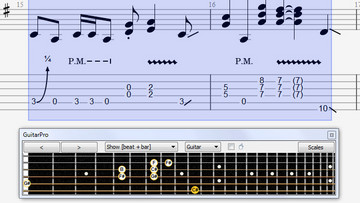 Note value (from whole note to sixty-fourth note), triolets, n-tuplets, rest, dynamics, accents, tied note, accidental, fingering for left and right hand, up and down pick strokes, barre chords, stems and ligatures. You can also add comments to the score, lyrics and chord diagrams.
Chords: Ask any chord and Guitar Pro will display all possible positions on the fretboard. Draw a diagram by clicking on the chord grid and see all matching names.
Scales: View and listen many scales from the most common to the most exotic ones. The selected scale can be displayed on the fretboard or piano to help you compose your song, write a solo or melody line.
Lyrics: Easily enter the lyrics of your songs and arrange them on top of your vocal track. You can also add annotations to point riffs or solos out that might need some extra explanation for being played properly.
Digital tuner and MIDI: The digital tuner allows you to tune your guitar by plugging it into your soundcard or via a microphone. The digital tuner works for all possible tunings (drop, open tunings, etc.).
Virtual instruments let you view and enter musical notes from a graphical representation of your instrument. It can display notes of the current time, the notes of the current bar or of the selected scale. Intuitive and easy to use, it is an ideal tool for beginners or tablature notation fans.
Mix your sounds ♪ Improve your technique ♪ Thousand of tabs online ♪ Share your music
The software is available in Czech, Danish, Deutsch, Greek, English, Spanish, Finnish, French, Hebrew, Croatian, Hungarian, Italian, Japanese, Korean, Norwegian, Dutch, Polish, Portuguese, Brazilian Portuguese, Romanian, Russian, Slovenian, Swedish, Turkish, Vietnamese, Traditional and Simplified Chinese.
Operating system: Windows 8, 10, 11, Mac OS X 10.4 or later
Lifetime Guitar Pro 8 license and one-time payment
♪ ♪ ♪ ♪ ♪
NEW: Top Features in Guitar Pro 8
1. Audio and Practice Tools
- Audio Track Integration: You can now add an external audio file (like an MP3 of a song, a backing track, or a vocal recording) to your Guitar Pro score. This feature includes a synchronization interface to perfectly align the score’s notation with the audio, making transcription and practicing much easier.
- Focus/Unfocus Track: Quickly amplify (focus) or attenuate (unfocus) the volume of the selected track to create a volume contrast with the rest of the mix, which is ideal for isolating a part during practice.
- Fixed Tempo: A new option allows you to play the entire score at a single, constant tempo, ignoring all tempo changes and automations in the score.
- Visual Metronome and Countdown: A visual metronome and countdown are displayed over the LCD screen during playback to help with rhythm and timing.
- Lock Line-In Sound: You can now lock your Line-In preset, keeping the same sound when switching tracks or opening new files.
2. Sound and Mixing
- New Pedalboard and Virtual Effect Chain: An updated pedalboard and effects chain editor allows for easier creation and customization of your perfect guitar sound. You can drag and drop effects and amps to build your chain.
- Drum Mixing: You can now fine-tune the sound of your drum kit by adjusting the volume and panning for each individual element (snare, kick, cymbals, etc.) within a single drum track.
- Audio Note Settings: Gain precise control over playback by customizing the offset, duration, and relative velocity of individual notes or selections, leading to more realistic and nuanced sound rendering.
- Sound Preview during Playback: Mouse over the sound presets to get an audio preview while your score is playing.
3. Editing and Notation
- Command Palette: A search bar, accessible with a keyboard shortcut, allows you to quickly find and apply any Guitar Pro feature or notation option, significantly speeding up the editing workflow.
- Design Mode Improvements: The improved design mode gives you more control over the layout. You can move beats individually and use an automatic guideline to easily align bar lines.
- Nested Tuplets: You can now create tuplets within tuplets (e.g., a sixteenth-note triplet inside an eighth-note triplet) for complex rhythmic notation.
- Updated Scale Diagrams: New options for editing and inserting scale diagrams, supporting guitars from 3 to 10 strings and customizable dot shapes, colors, and text.
- New Notation Options:
- Piano Fingering
- Sustain Pedal indication for piano scores.
- Improved Chord Transposition: The transposition tool has been enhanced to include diatonic transposition.
♪ ♪ ♪ ♪ ♪
NEW: Top Features in Guitar Pro 7.5
- Click & edit!
A major new feature for score editing. All you need to do now is click on the following elements of the score to edit them: title, clef, key signature, tempo, sections, tuning, chords, triplet feel, fermata… - Retrieve your Guitar Pro files faster
The browser lists all Guitar Pro files available on your hard disk or in a specific folder. The search box, together with the visual and audio preview, allow you to quickly find the files you are looking for. - Access the mySongBook score library
The browser also offers immediate access to the entire mySongBook collection (on subscription) or to files purchased on the website. Access a free new “Tab of the Day” every day. - Improved track-tuning window
We have completely redesigned the tuning window to make it more intuitive and easy to use. Now customize the tunings of your Guitar Pro 7.5 tracks string by string in just one click. - Customize your MIDI imports
The MIDI import window now offers many settings for you to get higher-quality Guitar Pro files: track merging, importing onto existing files, quantization, choice of notation and sound, preview… - Convert all your old files in one click
The batch converter allows you to convert all your Guitar Pro 1 to 6 files (.gtp, .gp3, ,gp4, .gp5, .gpx) into Guitar Pro 7 (.gp) format. Simply choose the folder (and subfolders, if any) containing the files to convert. The original files are not deleted.
Top features in Guitar Pro 7
-
- New interface
The interface gets more modern still, and more user-friendly. A toolbar contains the main functionalities of the software and an inspector simplifies choosing the song and tracks settings. - Performance and ease of use
Software startup and file loading have been enhanced. Scrolling and zooming are now both smoother. The install/update process is also improved. - High resolution
The software is compatible with high resolution screens (Retina and HD) and touch screens. - Quality of the score’s design
The score-display engine has been entirely rewritten for even more realistic, professional sheet music. - New musical notation elements
Notation now includes golpe, pick scrape, and dead slap. The writing of bends in standard notation has been enhanced, and we have improved the management of conflicts between the various elements of the score. - Tablature for all tracks
In addition to fretted instruments like guitars, standard notation gets automatically transposed into tablature — this on all tracks, including piano, voice or drums. - Connect your guitar to Guitar Pro
Plug your guitar into an external sound card connected to Guitar Pro and apply to it the effects exactly as they have been modeled for any track in a given file. - Polyphonic tuner
Simply brush down the six strings together to check their tuning in a single stroke. - New instrument banks
Many sounds have been added, including the dobro, flamenco, manouche, and 7-string nylon guitars, the electric sitar, fretless bass, jazz double bass, accordions, mellotron, harmonicas, bagpipe, new synthesizers, and drum machines. - Stereo sounds
You can choose between mono and stereo for all acoustic instruments, as well as add automatic spacialization to drumkits. - Simplified audio adjustments
Choose and modify your sound from over 1000 presets combining a soundbank and an effects chain. - Mixing MIDI/RSE
Guitar Pro 7 makes it possible, within any given single file, to mix tracks that use MIDI tones with others that use RSE tones. - Virtual fretboard and keyboard
The virtual-instrument (guitar, bass, banjo, and piano) windows are resizable. - Lock your files
You may lock your file to prevent any accidental modification. You may also add a password to it, to keep it from being opened or edited. - New audio-export formats
MP3, FLAC and Ogg formats are available when exporting RSE (Realistic Sound Engine) tracks. It is also possible to export all tracks separately in a single operation. - MIDI and MusicXML formats
Imports and exports in MIDI and MusicXML formats have been improved for better compatibility between Guitar Pro and other musical software programs.
- New interface
♪ ♪ ♪ ♪ ♪

 Dorico Notation Software – Advanced Music Notation System